RFP RESPONSE SOFTWARE
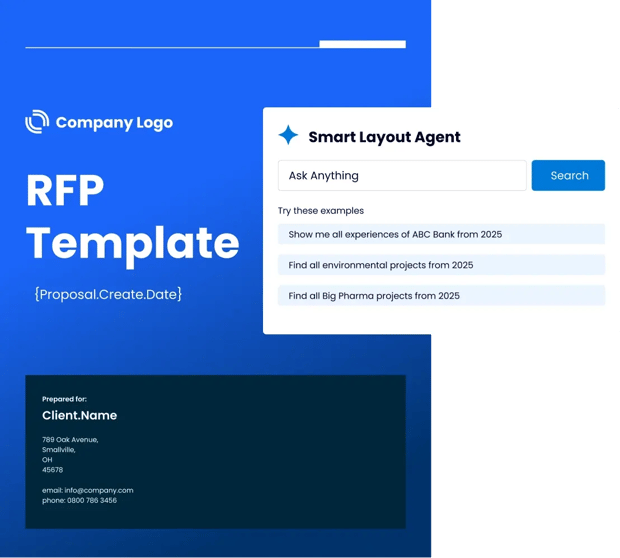
AI RFP Software for Faster Responses and More Wins.

Analyze requirements, surface approved answers, and build stronger RFP responses with intelligent agents that reduce manual work.
Microsoft 365 RFP response automation

Results That Impact Your Win Rate and Revenue

73 %

Faster RFI Completion

20 %

Increase in Win Rates

5 X

More RFP Responses

Automation Handles the Routine.
You Handle What Wins.

Automate

Automate Repetitive Tasks

Let Automation research requirements, surface approved answers, insert bios and case studies, and flag errors.
Work Smarter

Personalize What Matters

Focus on strategy and differentiation while specialist agents adapt tone, refine messaging, and align each response to the client.
Win smarter

Respond Faster, Win More

Reduce response time by up to 75% while improving quality, consistency, accuracy, and brand control.

How QorusDocs Works

Know Whether to Bid

Intelligent agents evaluate opportunity details and past performance to guide smarter bid/no-bid decisions, so your team can focus on the deals you’re most likely to win. 
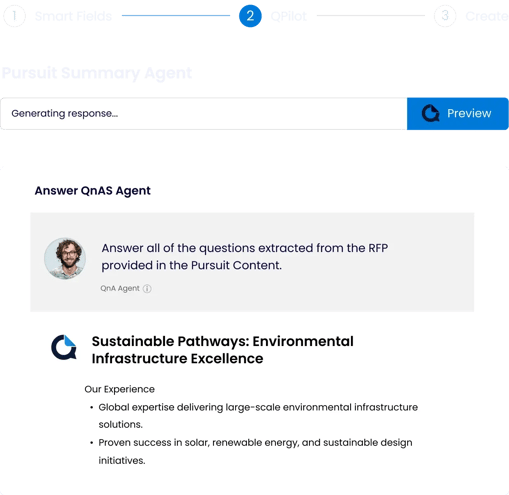
RFP response drafting using approved content

Draft Faster with Automation

Turn approved answers, bios, and case studies into a polished first draft in minutes, freeing your team to focus on strategy, differentiation, and client relevance. 

Get the Right Content Instantly

Smart Search surfaces approved answers, past responses, case studies, and compliance language directly in Microsoft 365—so your team can respond faster with accurate, consistent content. 
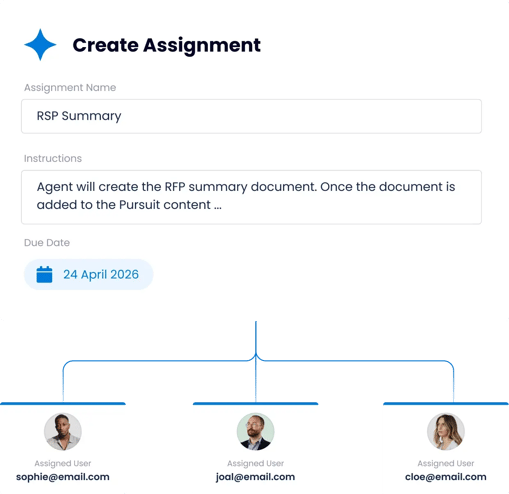
Enterprise RFP assignment and deadline management

Keep Everyone Aligned

Use Pursuits to collaborate with your team of people and agents to assign tasks, track deadlines, and manage SME input, automating handoffs, reducing bottlenecks, and keeping every pursuit on track.

Turning RFPs into Measurable Wins

" We ran a formal RFP with a dozen vendors, and QorusDocs clearly stood out. They even responded to our XLS RFP using their own platform—seamlessly. The AI is smart, safe, and helps our team work faster with vetted prompts and automation. It’s hands down the best proposal and content platform we’ve used."


Celeste Matheis

Manager II, Enterprise Deal Support, US Proposal Center
Strategic Pricing and Deal Management, Ricoh USA
Celeste Matheis

QorusDocs - Go Beyond the Basics of Copilot

Capability

ChatGPT / Claude

What it is

Purpose-built proposal, RFP, and business case platform.
General-purpose AI productivity assistant, embedded across Microsoft 365 apps.
General-purpose AI chat assistant, used independently of any specific business process.

Purpose-Built for Proposals and SOWs

Tailored for RFPs, SOWs, pitches, and business cases, with built in workflows and templates.
Not purpose-built for proposal, RFP work; supports drafting and productivity tasks broadly.
Not purpose-built for proposal, RFP work; can draft a single answer, but no structure for a full proposal.

Integration & Data Access

Native in Word, PowerPoint, Outlook, Teams, with content pulled from a governed library.
M365 tenant access by default; external systems like CRMs or libraries require IT connectors.
Can connect to SharePoint, Salesforce, HubSpot, Microsoft 365, but retrieves raw content. 

Content & Templates

Brand-approved content library plus proposal-ready layouts (bios, tombstones, grids).
Manual setup; limited template options, improving with brand kits.
No content library; doesn't know your approved language, case studies, or certifications.

Security & Governance

Microsoft Azure OpenAI; customer data does not train public models; SOC 2 Type II, GDPR compliant.
Security depends on tenant configuration; governance has to be set up manually.
Data handling, enterprise controls vary; no built-in record of legal, security, or technical sign-off.

Workflow & Compliance

SME assignments, deadlines, approvals, and compliance tracking built into the process.
Not purpose-built for RFP ownership, routing, or review.
No workflow layer; each answer is generated in isolation, with no assignment or audit trail.

Personalization & Collaboration

Automates content reuse frompast wins, with workflows and assignments across contributors.
Generates generalized suggestions; no native pursuit workflow tools.
No memory of win themes or narrative across a long response; each answer stands alone.

Final Deliverable Output

Branded, client-ready Word and PowerPoint documents, produced from the workflow itself.
Can generate and format documents and decks, but doesn't manage the pursuit process.
Answers must be copied out and manually reassembled into a branded, client-ready document.

Win-Rate Optimization

Engagement tracking, bid/no-bid insights, and past-win guidance.
Not available.
Not available.

What it is

Purpose-built proposal, RFP, and business case platform.

Purpose-Built for Proposals and SOWs

Tailored for RFPs, SOWs, pitches, and business cases, with built in workflows and templates.

Integration & Data Access

Native in Word, PowerPoint, Outlook, Teams, with content pulled from a governed library.

Content & Templates

Brand-approved content library plus proposal-ready layouts (bios, tombstones, grids).

Security & Governance

Microsoft Azure OpenAI; customer data does not train public models; SOC 2 Type II, GDPR compliant.

Workflow & Compliance

SME assignments, deadlines, approvals, and compliance tracking built into the process.

Personalization & Collaboration

Automates content reuse frompast wins, with workflows and assignments across contributors.

Final Deliverable Output

Branded, client-ready Word and PowerPoint documents, produced from the workflow itself.

Win-Rate Optimization

Engagement tracking, bid/no-bid insights, and past-win guidance.

What it is

General-purpose AI productivity assistant, embedded across Microsoft 365 apps.

Purpose-Built for Proposals and SOWs

Not purpose-built for proposal, RFP work; supports drafting and productivity tasks broadly.

Integration & Data Access

M365 tenant access by default; external systems like CRMs or libraries require IT connectors.

Content & Templates

Manual setup; limited template options, improving with brand kits.

Security & Governance

Security depends on tenant configuration; governance has to be set up manually.

Workflow & Compliance

Not purpose-built for RFP ownership, routing, or review.

Personalization & Collaboration

Generates generalized suggestions; no native pursuit workflow tools.

Final Deliverable Output

Can generate and format documents and decks, but doesn't manage the pursuit process.

Win-Rate Optimization

Not available.

ChatGPT / Claude

What it is

General-purpose AI chat assistant, used independently of any specific business process.

Purpose-Built for Proposals and SOWs

Not purpose-built for proposal, RFP work; can draft a single answer, but no structure for a full proposal.

Integration & Data Access

Can connect to SharePoint, Salesforce, HubSpot, Microsoft 365, but retrieves raw content. 

Content & Templates

No content library; doesn't know your approved language, case studies, or certifications.

Security & Governance

Data handling, enterprise controls vary; no built-in record of legal, security, or technical sign-off.

Workflow & Compliance

No workflow layer; each answer is generated in isolation, with no assignment or audit trail.

Personalization & Collaboration

No memory of win themes or narrative across a long response; each answer stands alone.

Final Deliverable Output

Answers must be copied out and manually reassembled into a branded, client-ready document.

Win-Rate Optimization

Not available.

Ready to win more RFPs with QorusDocs?

See how QorusDocs combines Automation, approved content, and Microsoft 365 workflows to help your team respond with greater speed, consistency, and confidence.

FAQs: RFP Responses with QorusDocs

What is AI RFP software?

AI RFP software helps teams respond to Requests for Proposals faster and more consistently by automating the most time-consuming parts of the process. That includes surfacing approved answers from a content library, drafting first-pass responses, inserting bios and case studies, checking for errors, and coordinating SME input. QorusDocs goes further by handling these tasks through intelligent agents that work directly inside Microsoft 365, so teams spend less time on assembly and more time on the strategic messaging that actually wins.

How is QorusDocs RFP software different from other RFP tools?

Most RFP tools are built around a content library that teams maintain and query. QorusDocs uses agents to handle the repetitive work automatically, from bid/no-bid analysis through to final formatted output in Word and PowerPoint. The result is a response that is not just faster to produce but genuinely client-ready, with consistent brand formatting, approved content, and personalized messaging built in. For professional services, legal, AEC, and technology services teams, the templates and workflows are also tailored to how those industries actually write and win RFP responses, not adapted from a generic sales process.

Does QorusDocs work for RFPs across different industries?

Yes. QorusDocs is purpose-built for professional services, with dedicated support for legal, AEC, consulting, and technology services workflows. Legal teams use it for RFP responses, fee proposals, and panel pitches. AEC firms use it for pursuit documents. IT and technology services teams use it for RFP responses and SOWs. Each vertical has tailored templates, terminology, and workflows rather than a one-size-fits-all approach.

How does QorusDocs help with bid/no-bid decisions?

Intelligent agents review opportunity details and past performance data to help teams make faster, smarter decisions about which RFPs to pursue. This matters because 10 to 19% of RFPs go unanswered simply due to time and resource constraints. Better bid/no-bid decisions mean teams focus effort on the opportunities they are most likely to win, rather than spreading capacity across every incoming request regardless of fit.

How does QorusDocs handle RFP collaboration and SME input?

QorusDocs uses Pursuits as the central workspace for each RFP, bringing together tasks, deadlines, content, and contributors in one place. Agents automate handoffs and reminders, reducing the bottleneck of chasing SME responses manually. Teams can assign sections, track progress, and manage review cycles without switching between tools, which matters when the average proposal involves six to fifteen contributors across different time zones and teams.

What does the RFP output look like?

The final output is a polished, client-ready document formatted directly in Microsoft Word or PowerPoint. This is not a document exported from a separate tool that needs reformatting. Teams work inside and output to the Microsoft 365 apps they already use, and the output reflects the firm's brand standards without manual formatting work. For professional services firms where every client-facing document reflects on the firm's reputation, that level of polish matters.

How quickly can teams get started with QorusDocs RFP software?

Most teams are producing RFP responses within weeks of onboarding. QorusDocs has a 95% vendor support satisfaction score and 92% training satisfaction rating from SoftwareReviews, and implementation is built around your actual workflows rather than a generic setup process. Teams that have made the switch consistently report they wish they had done it sooner.

Ready to Elevate Your RFP Responses?